


Phishing attacks in crypto hit people where they feel safest: inside trusted apps and familiar brands. Criminals pose as wallets, exchanges, or support agents. They borrow the look and language of real teams. They rush the target. They harvest keys, seed phrases, or session tokens. Money moves in minutes and rarely comes back.
The good news is simple. Clear habits stop most tricks. This guide explains how these scams operate, what to look out for, and how to establish robust defenses. It also shares key stats and rules that shape the fight against phishing attacks in crypto.
What Phishing Looks Like In Crypto

Phishing is a setup. An attacker impersonates a trusted source and asks for action. The hook can be an email, text, DM, QR code, fake help desk, or a cloned site. The goal stays the same. Steal secrets or push a harmful on-chain action.
In crypto, attackers push victims to connect a wallet, sign a request, or reveal a seed phrase. They may drain tokens with one approval. They may swap addresses or poison history so the next paste sends funds to them. They prefer speed. They press for action now.
Why Phishing Attacks In Crypto Keep Rising
Crypto moves fast and final. A signed approval can grant wide access. A seed phrase opens the vault. That makes social tricks very profitable. Criminals test new lures each cycle and copy what works.
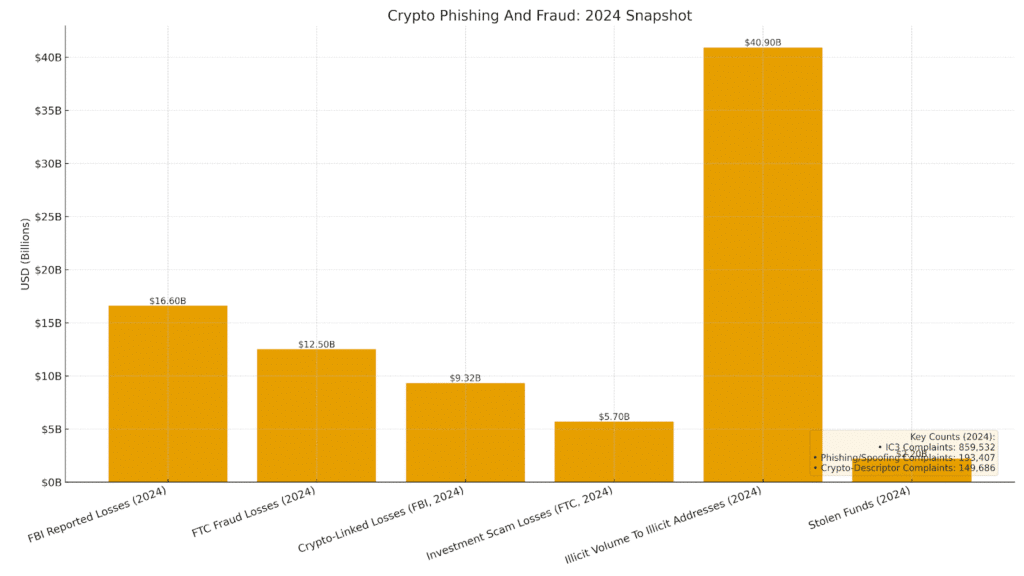
Public numbers show the pressure. The FBI’s Internet Crime Complaint Center logged 193,407 phishing or spoofing complaints in 2024, and tracked more than $9.3 billion in losses where cryptocurrency played a role across crime types. Investment fraud led to losses at $6.57 billion.
The FTC reports $12.5 billion in fraud losses in 2024, with $5.7 billion tied to investment scams. Crypto schemes sit inside that surge.
On-chain data backs this trend. Chainalysis estimates illicit addresses took in $40.9 billion in 2024 and notes stolen funds rose about 21 percent to $2.2 billion. Private key compromises made up the largest share.
The Core Tactics Criminals Use
Attackers lean on a few patterns. Know these and most traps lose power. Each pattern aims at one of three goals: harvest secrets, trick a wallet into a bad signature, or reroute a payment.
Cloned Websites And Fake Logins
Scammers copy exchange and wallet sites. They buy look-alike domains and run search ads. They capture login data or push a malicious wallet connection. The page can look perfect. The URL will not.
Fake Support And Help Desk Chats
A fake agent reaches out by DM or email. They ask the user to “verify” a seed phrase, install a tool, or share a screen. Real support will never ask for a seed phrase. Real support does not need remote control of a device.
Giveaway, Airdrop, And Allowlist Lures
A free token drops tomorrow. A user must connect a wallet now. The signature prompts look harmless, but one approval can give a rogue contract broad access. The line “gasless claim” often masks a drain.
Address Poisoning And QR Code Traps
Attackers send tiny transfers from look-alike addresses. The target copies the wrong entry from history. QR code invoices and wallet posters can also encode a hostile address. Shortcuts save seconds but risk funds.
Malware Links And File Drops
A “document” arrives as a zip, pdf, or installer. It plants a stealer that hunts wallet files, cookies, and 2FA tokens. Even a browser extension can spy on wallet prompts.
How To Verify Identities And Links
Trust starts with checks the user can control. These checks take seconds and stop most attacks.
Verify The Domain And Certificate
Type the domain by hand or use a saved bookmark. Check the full address bar, not only the padlock. Watch for letter swaps and extra words. If the site asks for a seed phrase, leave at once. No real site should ask for it.
Confirm Through A Second Channel
If support reaches out, hang up the chat. Open the app or site and start a new ticket. Ask a simple question only the real team can answer. Use a known handle or a verified email.
Use Read-Only And Hardware First
Set a watch-only wallet on mobile to view balances. Use a hardware wallet for actions. Confirm on the device screen what the contract will do. Reject if the text is vague or the spender looks wrong.
Wallet Safety Fundamentals
Wallet setup and daily use decide most outcomes. A few habits raise safety a lot.
Guard The Seed Phrase Like Cash
Write it on paper. Store it in two safe places. Never type it into a website. Never paste it into chat. If anyone asks for it, that person is a thief.
Lock Down Approvals
Use a tool to review allowances for each token and chain. Revoke what you no longer need. Keep a low-fund daily wallet for routine use and a cold vault for savings.
Segment Activity
Use separate wallets for minting, testing, and long-term holding. Label them. If a mint wallet gets hit, the vault stays safe. Move profits to the vault on a set schedule.
Email, DM, And Social Hygiene
Inbox and chat are common entry points. Simple rules lower risk.
Slow Down And Validate
Urgency is the bait. Pause. Read the sender. Check the domain after the @ sign. Hover links. Open nothing from unknown senders. If a friend sends a strange link, confirm on a call.
Use Strong Defaults
Turn on multi-factor with an authenticator app. Use a password manager to fill only on real domains. If it does not fill, the site may be fake.
Keep A Public-Private Divide
Do not post wallet addresses used for savings. Keep public addresses for tips and NFTs. Never link a vault address to social profiles.
Smart Signing On DeFi And NFTs
Most drains start at the signature step. The fix is to read before tapping confirm.
Read The Spend And The Spender
Check the token, the amount, and who can spend it. Unlimited approvals save gas but raise risk. Use limited approvals where possible.
Use Simulation
Use a transaction simulator or a wallet that previews effects. If a swap says it will transfer all assets or grant wide control, stop.
When In Doubt, Cancel
It is fine to miss a mint. It is not fine to lose the vault. Walk away if anything feels off.
Phishing Patterns And Safe Responses
| Phishing Pattern | Main Red Flag | Quick Check | Best Response |
| Cloned login page | Off-brand domain | Type the URL from memory | Close tab and use bookmark |
| Fake support DM | Seed phrase request | Open official support page | Report and block |
| Airdrop lure | Gasless claim prompts | Read contract text on device | Decline and disconnect |
| Address poisoning | Look-alike address in history | Compare first and last 6 chars | Copy from an allowlist |
| QR code trap | Code from unknown source | Show link target before scan | Use manual entry |
| File-based malware | Unsolicited zip or exe | Virus scan in a sandbox | Delete without opening |
Security And Regulatory Context

Advertisement Banner
Law enforcement and regulators track these threats and publish guidance. Their data helps users measure risk.
The FBI’s IC3 tallied 859,532 complaints in 2024 with reported losses of $16.6 billion. Phishing and spoofing led to a complaint count at 193,407. A cryptocurrency descriptor appeared in 149,686 complaints, with crypto-linked losses totaling $9.32 billion across crime types.
The FTC reports that total consumer fraud losses reached $12.5 billion in 2024. Investment scams cost consumers $5.7 billion. Crypto schemes form a large slice of that investment category.
On-chain analytics tell a related story. Chainalysis estimates that illicit addresses received $40.9 billion in 2024. It also reports stolen funds up about 21 percent to $2.2 billion, with private key compromises as the top driver.
These numbers show a clear link between social tricks and on-chain theft. They also show why strong identity checks and safer wallet habits reduce losses from Phishing Attacks in Crypto.
How To Check Airdrops, Mints, And Claims
Airdrops and allowlists attract active users first, so attackers copy them. A safe process prevents most losses.
Confirm The Source
Start from an official site or a project’s verified social link. Cross-check in the project’s Discord or blog. Avoid any claim form shared only in DMs.
Inspect The Contract
Open the contract on a trusted block explorer. Check the verified source code and the creator address. Search past transactions for drains or complaints. If anything looks hidden or rushed, skip it.
Payments, Invoices, And Address Control
Sending funds demands care. A slip can move money to the wrong place.
Use An Allowlist
Save known addresses in your wallet or manager. Confirm by voice with a contact before first use. When paying later, select from the saved list. Do not copy from recent history.
Test Sends For New Counterparties
Send a very small amount first. Wait for a confirmation from the receiver on a known channel. Then send the rest.
Cold Storage And Multi-User Safeguards
Long-term assets deserve extra layers. Teams benefit from shared controls.
Cold Storage For Savings
Keep vault funds on a hardware wallet or a multisig. Store the backup seed offline. Rotate the device if it leaves your control.
Multisig For Teams
Set a threshold for spending. Use separate keys held by different people. Limit daily transfer caps. Log and review every approval.
Incident Response: What To Do After A Mistake
Speed matters after a slip. A short plan helps channel stress into action.
Freeze Access And Revoke
If you signed a bad approval, revoke it at once. Use a token approval manager. Move remaining funds to a clean wallet.
Notify And Report
Alert your exchange or wallet provider. If funds passed through a known service, they may be able to flag addresses. File a report with IC3 and your local authority. These reports feed the systems that seize funds and stop repeat offenders.
Reset Devices
If you opened a suspect file, reset the device and change passwords. Reinstall wallets from official sites. Restore from the seed phrase only on a clean machine.
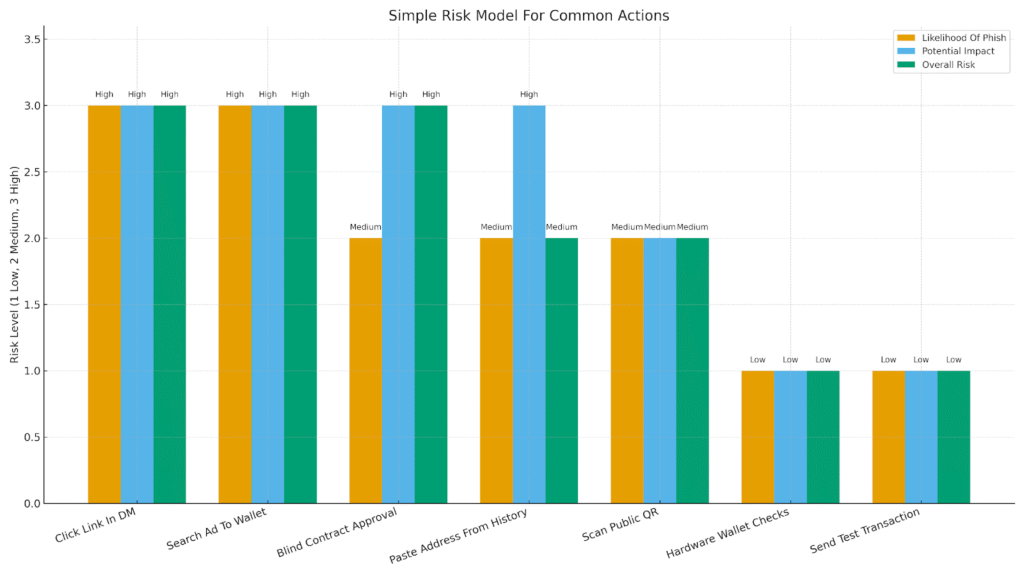
Simple Risk Model For Common Actions
| Action | Likelihood Of Phish | Potential Impact | Overall Risk |
| Clicking a link in a DM | High | High | High |
| Using a search ad to reach a wallet site | High | High | High |
| Signing a blind contract approval | Medium | High | High |
| Pasting an address from history | Medium | High | Medium |
| Scanning a public QR code | Medium | Medium | Medium |
| Using a hardware wallet with on-device checks | Low | Low | Low |
| Sending a test transaction first | Low | Low | Low |
Regional Notes And Evolving Threats
National actors and organized groups now use social lures at scale. Authorities say North Korean groups continue to target crypto firms and users, pairing social engineering with malware and fake job offers. Reports link them to hundreds of millions in 2024 alone. This shows why basic identity checks and device hygiene still matter most.
Putting It All Together
Two habits block most Phishing Attacks in Crypto. First, control entry points. Type domains, use bookmarks, and confirm identities on a second channel. Second, control signatures. Read the spender and the amount on a hardware screen. If the text looks odd, stop.
These habits take seconds, not hours. They work even as tactics change. They place the user in control.
Conclusion
Phishing attacks in crypto thrive on speed and confusion. Clear habits slow them down. Users who type domains, confirm identities, and read every approval keep control. Teams that segment wallets, enforce multisig, and review allowances cut risk even more. The threat will evolve, but these rules hold. The smartest trade is the one that keeps the keys safe.
Treat every request for credentials as hostile until proven legitimate through independent verification. Build habits that slow decisions, confirm intent on a second channel, and prioritize hardware-backed approvals.
Glossary
- Address Poisoning: A trick where an attacker plants a look-alike address in history so the user copies it by mistake.
- Airdrop: A token distribution that may require a wallet connection. Scammers often mimic it.
- Allowlist: A saved list of verified addresses or domains used for safe sending.
- Approval: Permission a wallet grants a contract to move tokens. A wide approval can enable drains.
- Cold Storage: Offline key storage, often on a hardware wallet, used for long-term funds.
- Multisig: A wallet that needs more than one key to approve a transaction.
- Private Key: A secret used to sign transactions. Anyone with it can move funds.
- Seed Phrase: A set of words that can rebuild a wallet. It must stay offline and private.
- SIM Swap: A takeover of a phone number used to intercept codes and reset accounts.
- Transaction Simulator: A tool or wallet feature that previews effects before a user signs.
Frequently Asked Questions About Phishing Attacks in Crypto
What is the fastest way to spot a phishing page?
Check the full domain in the address bar. If it is not the exact domain you expect, leave. A password manager that fails to auto-fill is another strong sign.
Should a wallet ever ask for a seed phrase on a website?
No. A seed phrase belongs offline. Any site that asks for it is a scam.
How often should token approvals be reviewed?
Review them monthly or after each new app. Revoke any you do not need.
Is a hardware wallet enough to stop all scams?
It helps a lot but does not solve everything. You still need to read each prompt and confirm the spender and amount.
What should someone do after signing a bad approval?
Revoke the approval at once, move remaining funds to a clean wallet, and report the incident to the proper channels.
Summary
Phishing attacks in crypto keep rising because they target trust, not code. Criminals clone sites, pose as support, push fake airdrops, and plant look-alike addresses. Strong habits stop most traps. Type domains or use bookmarks. Verify requests through a second channel. Store seed phrases offline and never share them. Use a hardware wallet and read every approval on the device screen. Review and revoke token allowances often. Use separate wallets for daily use and savings. Send small test payments to new addresses. If something goes wrong, revoke access, move funds to a clean wallet, and file an IC3 report. FBI, FTC, and Chainalysis data show big losses tied to phishing and investment fraud, so small checks make a large difference.
Advertisement Banner